




 Full lifecycle cost tracking: acquisition, maintenance, usage, and disposal
Automated cost feeds from work orders, parts usage, and depreciation
Supports budgeting, procurement planning, and replacement justification
Visual dashboards and reporting exports













Downtime-to-cost mapping by asset, department, or shift
Configurable cost-per-hour rates by asset type or line
Real-time and historical cost analysis by cause, location, or team
Integration with performance and TCO metrics
Visual dashboards showing cumulative and top-impact events
Exportable reports for finance, operations, and audit teams


Event-level logging for user actions across the system
Timestamped entries with usernames and source modules
Searchable log by user, action type, or date range
Read-only structure ensures data cannot be altered retroactively
Supports compliance workflows, audit reviews, and usage reports
Link logs to records such as work orders, assets, or reports


Custom checklist templates by job type, asset, or location
Preset checklist items with predefined questions and response types
Support for static options or dynamic lookups (e.g., Work Types table)
Auto-assignment to work orders, inspections, or audits
Completion tracking with timestamp and technician signature
Version control and publishing workflow for standards
Seamless use across inspections, maintenance, and compliance tasks



Failure mode logging with asset, location, and work order references
Customizable classification (mechanical, electrical, human error, etc.)
Failure frequency and severity scoring
Trend analysis by asset class, time period, or technician
Root cause fields and resolution notes
Integrates with PM planning to adjust maintenance schedules
Reporting for reliability improvement and compliance audits



Real-time downtime logging with start/stop tracking
Classify downtime (planned, unplanned, external, internal)
Link logs to asset records, inspections, and work orders
Root cause and impact tagging with resolution tracking
Downtime dashboards with filters by asset, line, or reason
Exportable reports for audits, analysis, or KPI reviews
Integration with maintenance and performance workflows

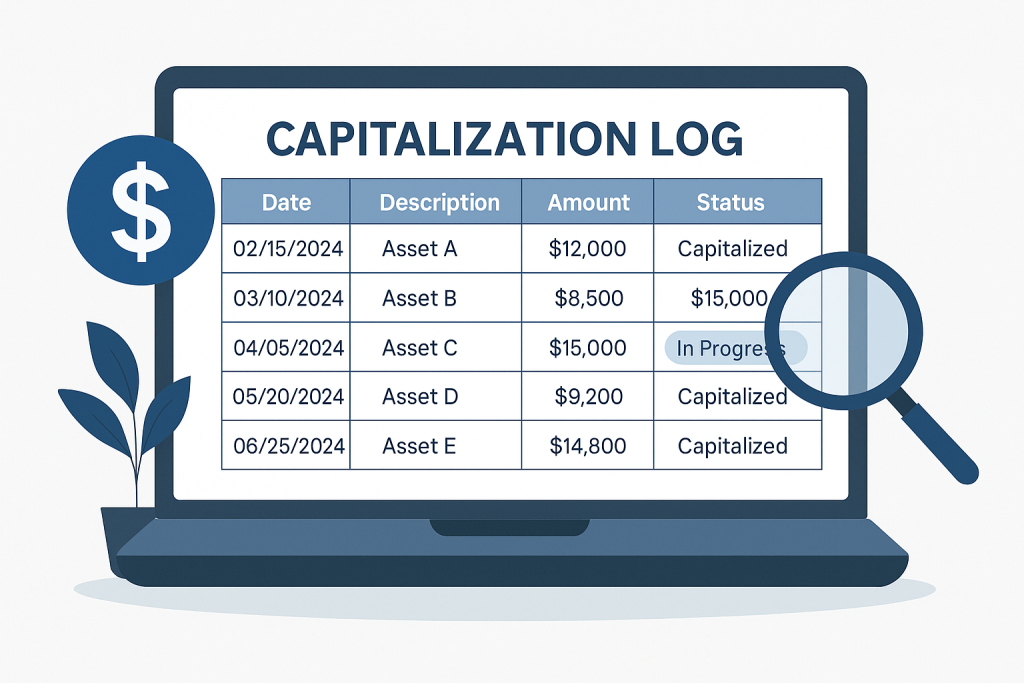
Centralized Asset Record: A comprehensive hub for all asset-related data, from procurement to retirement.
Event-Level Tracking: Records work orders, maintenance, and other events with supporting documentation.
Reporting Capabilities: Generate reports for audits, depreciation, and financial planning.
Audit-Ready Data: Every entry includes timestamped records and responsible users for full traceability.


AI Integration: Smart Suggestions Built Into the Work
The AI Integration app connects your operational data to AI engines that automate tasks, surface insight, plus recommend the next best action. It classifies requests, summarizes histories, plus flags anomalies, working in the background on your own data.

Why does so much routine decision-making still eat the day?
A lot of work is judgment that repeats. Which request is urgent, which record looks off, what usually comes next. A person makes that call dozens of times a day, pulling context from memory and from screens they have to open one by one.
It adds up to slow handoffs and missed signals. A high-priority request waits in a queue because nobody flagged it, or an anomaly slips through because the one person who would have caught it was busy. In 2026, the repetitive judgment a system could surface is judgment your team should not be spending its hours on.
AI Integration handles the repeating part. It reads the data already in the system, makes a suggestion, plus flags what looks wrong, so the person decides instead of digging. The judgment stays human; the legwork does not.
How does the AI work on your own data?
The engine sits inside your workflows, using your data and your guardrails. It classifies incoming requests, routes and prioritizes them, auto-fills fields with context, plus summarizes a long history into something a person can act on. Every suggestion is tied to the records behind it.
It also watches for trouble. Predictive alerts fire on behavior and thresholds, exceptions and anomalies get flagged, and risk-sensitive tasks carry a confidence score so a person knows how much to trust the call. An AI-driven audit trail records the context behind each suggestion, and the engine tunes itself from feedback and overrides.
It runs natively, so there is no third-party AI model exposure and your data stays on the platform. Most deployments run in weeks, not months, because the AI works on the data already there. The team stops doing the legwork a system can do.
What apps does AI Integration connect to?
 Work Orders
 Certifications
 Inventory Control
 Invoices & Quotes
 Accounts & Transactions
 Project Templates
 Client Tracking
 CRM
CRM Fixed Asset Management
How is your data protected when the AI runs?
AI Integration works natively on the platform hosted by Phoenix Consultants Group. Your operational data never leaves for a third-party AI model. The engine runs inside your own guardrails and role-based access, so a suggestion only draws on data the user is cleared to see.
Every AI suggestion carries an audit trail with the context behind it, so a recommendation can always be traced back to the data that produced it.
What does AI Integration give your team?
 Intelligent task routing and auto-prioritization across requests.
- Predictive alerts on behavior and thresholds.
- In-app decision prompts tied to your historical data.
- Automatic flagging of exceptions and anomalies.
- AI-driven audit trails with context for every suggestion.
- Confidence scoring for risk-sensitive tasks.
- Runs natively, with no third-party AI model exposure.
- A self-tuning engine driven by feedback and overrides.
It catches what we miss. AI is not just analytics anymore. It is a partner in getting work done right.Technical Operations LeadNational Services Group
Built by people who answer the phone
Phoenix Consultants Group has built custom software since 1995. About a third of that work has been operations and compliance tracking for environmental and industrial firms, where the cost of a missed signal is measured in fines and downtime. AI Integration comes from that experience.
The same engine powers plain-English reporting against your live data. A compliance officer or an operations lead can ask a question in plain language and get an answer from their own records, with no canned report and no waiting on IT. Most deployments still run in weeks, not months.
What changes operationally after deployment?
- Urgent requests get flagged before they sit in a queue.
- An anomaly surfaces without one person catching it.
- People decide instead of digging for context.
- A risk-sensitive call comes with a confidence score.
- Your data never leaves for an outside model.
Ikhana explains every AI suggestion
When the AI recommends an action, Ikhana is right there to explain why. The on-screen guide shows the context behind a suggestion, so a user trusts the call instead of guessing at it.
Learn moreFrequently Asked Questions
What does FireFlight's AI Integration actually do?
What does FireFlight's AI Integration actually do?Does our data go to a third-party AI model?
Does our data go to a third-party AI model?Can I trust the AI on a risk-sensitive decision?
Can I trust the AI on a risk-sensitive decision?How does the AI know what to prioritize?
How does the AI know what to prioritize?Can we still override the AI?
Can we still override the AI?How long does it take to get AI Integration running?
How long does it take to get AI Integration running?Phoenix Consultants Group. Founded 1995. FireFlight Data Systems is PCG's hosted platform. Last updated June 2026.
Lifecycle Status Tracking: Know Where Every Asset Stands, Always
Track every asset from acquisition through decommission across configurable lifecycle stages. Auto-transitions trigger when maintenance or inspection events complete. Full audit trail on every status change, with compliance rules that enforce process sequence before an asset can advance.

In 2026, operations tracking asset lifecycle in spreadsheets are managing two separate problems simultaneously: keeping the spreadsheet current and keeping the process honest. An asset in a spreadsheet marked active may be sitting in a storage room waiting for an inspection that nobody scheduled. An asset marked under review may have been returned to service three weeks ago without the record being updated. FireFlight's Lifecycle Status Tracking app makes the stage reflect reality rather than the last time someone remembered to update a cell.
Schedule your free consultationHow do configurable lifecycle stages and auto-transitions work in FireFlight?
Lifecycle stages in FireFlight are not fixed. PCG configures the stage definitions, transition rules, and compliance requirements for your specific asset classes during deployment. A medical device has different lifecycle requirements than a fleet vehicle, which has different requirements than a server. The app supports all three without requiring a compromise on any of them.
Auto-transitions trigger stage changes based on completed events rather than requiring manual updates. When a maintenance work order closes, the asset transitions automatically from in maintenance to commissioned if all required checks passed. When an inspection fails, the asset moves to flagged for review without waiting for someone to notice the result and update the record. The stage reflects what actually happened rather than what someone remembered to enter.
PCG has been building asset lifecycle systems for regulated industries since 1995. Healthcare equipment that cannot be used without a current inspection, industrial machinery that requires certification before returning to service, IT hardware that needs to clear a security review before deployment: the stage logic in this app is built from that range of real compliance requirements rather than from a generic status field with no enforced rules.
How does compliance enforcement connect to lifecycle stages in FireFlight?
Compliance rules attach to lifecycle stages and govern transitions between them. An asset cannot advance from under inspection to commissioned without a completed inspection checklist. It cannot move to decommissioned without a completed capitalization log entry. The stage logic enforces the sequence rather than depending on individual discipline to follow the correct process before advancing the record.
For regulated industries where asset status has direct compliance implications, this enforcement is the difference between a process that works consistently and one that works only when the right person is paying attention. The system blocks the non-compliant transition rather than allowing it and flagging it later. By the time an auditor asks, the required step was either completed or the asset never advanced past the stage that required it.
What apps does Lifecycle Status Tracking integrate with?

What uncontrolled lifecycle status costs regulated operations: Equipment returned to service before the required inspection was completed. Assets written off for accounting purposes still showing as active in the operations system. Decommissioned hardware accessible to users because the status change never triggered an access revocation. Each of those failures has a compliance exposure that exceeds the cost of the process control that would have prevented it.
FireFlight's Lifecycle Status Tracking app closes each of those gaps by making the stage transition a controlled event rather than a free-form update. The rules are in the system. The audit trail documents what happened. The compliance requirement either completed or the transition did not occur. PCG has been building process control systems for regulated asset environments for over 30 years. The enforcement mechanism is what makes the record meaningful rather than decorative.
Your Personal Guide on Every Page
From the first click to the final step, Ikhana, your on-screen tutor, shows you how it all works. Every field, every button, every page explained with clarity, right where you need it.
In the Lifecycle Status Tracking app, Ikhana walks compliance managers, asset coordinators, and operations teams through stage configuration, transition rule setup, and audit trail navigation. New team members understand the lifecycle process from their first day without requiring a separate briefing on the compliance requirements behind each stage.
Learn more about IkhanaWhat does the Lifecycle Status Tracking app actually do?
-
Configurable lifecycle stages with status logic and business rules: Stage definitions, transition rules, and compliance requirements are configured for your specific asset classes. Medical devices, industrial machinery, and IT hardware each carry their own stage logic without compromise. PCG configures the rules for your operation during deployment.
-
Auto-transitions based on maintenance and inspection events: Stage changes trigger automatically when linked events complete rather than waiting for a manual record update. A closed maintenance work order advances the asset stage. A failed inspection flags the asset without requiring someone to notice the result and update the record separately.
-
Lifecycle visuals with current stage indicators and history logs: Every asset displays its current stage and the full history of previous stages with timestamps. The visual stage indicator shows where the asset is in its lifecycle at a glance. The history log shows every transition, every trigger event, and every user involved.
-
Compliance enforcement tied to asset stage: Required steps block stage transitions until completed. An asset cannot advance to the next stage without the compliance requirement for the current stage being met. The process sequence is enforced by the system rather than by individual discipline.
-
Stage-triggered checklists, inspections, and maintenance workflows: Entering a lifecycle stage can generate required checklists or work orders automatically. The stage drives the workflow. Required tasks appear without requiring someone to manually initiate each step after the stage change.
-
Audit trail for every status change and user action: Every transition timestamps with the user who initiated or confirmed it and the event that triggered it. The full audit trail documents the compliance sequence from acquisition through current status. For regulatory inspections, the trail answers the process question before it is asked.
What PCG learned building lifecycle management systems across 31 years of regulated asset environments: The compliance gap that produces the most audit findings is not the one where people deliberately skip steps. It is the one where the required step was completed but never recorded, or where the record was updated without the required step actually happening.
FireFlight's Lifecycle Status Tracking app closes both gaps. Completed events trigger stage transitions automatically so the record updates when the step happens rather than when someone remembers to update it. Compliance requirements block transitions so the step has to happen before the record advances. Both directions of the problem are addressed by the same system. Deployments complete in weeks, not months, and existing asset records integrate with their current lifecycle status as part of the process.
"Every asset has a lifecycle. Ours used to live in spreadsheets. Now it lives in the system, and so do the rules that govern each stage."Compliance SupervisorManufacturing Services
What changes after deploying Lifecycle Status Tracking?
-
Asset status reflects reality rather than the last manual update. Auto-transitions keep the record current when events complete rather than when someone remembers to change the status field.
-
Required compliance steps cannot be skipped. The system blocks the transition until the required checklist, inspection, or capitalization entry is complete. The audit trail documents that the sequence was followed.
-
Regulatory inspections are answered from the lifecycle history. The full stage sequence, every transition, and every linked event is in the system record rather than assembled from paper logs and staff recollection.
-
Assets in ambiguous states become visible. Equipment waiting for an inspection that was never scheduled, hardware in transit with no return record, and machinery flagged for decommission that is still showing as active all surface when the stage logic has rules rather than free-form text fields.
-
Financial and operational records stay synchronized. Capitalization log entries connect to lifecycle stage transitions. Ownership custody changes link to commissioning and decommissioning events. The connected records update together rather than diverging over time.
Questions about FireFlight Lifecycle Status Tracking
What lifecycle stages can FireFlight track for assets?
What lifecycle stages can FireFlight track for assets?
How do automatic lifecycle transitions work in FireFlight?
How do automatic lifecycle transitions work in FireFlight?
Does FireFlight keep a full audit trail of lifecycle status changes?
Does FireFlight keep a full audit trail of lifecycle status changes?
How does Lifecycle Status Tracking connect to compliance requirements?
How does Lifecycle Status Tracking connect to compliance requirements?
Can lifecycle stages trigger checklists, inspections, and maintenance workflows?
Can lifecycle stages trigger checklists, inspections, and maintenance workflows?
How does Lifecycle Status Tracking connect to capitalization and ownership records?
How does Lifecycle Status Tracking connect to capitalization and ownership records?
How long does it take to deploy Lifecycle Status Tracking in FireFlight?
How long does it take to deploy Lifecycle Status Tracking in FireFlight?
In 2026, an asset status field with no enforcement rules is just a label. FireFlight's Lifecycle Status Tracking app makes every stage a controlled transition with compliance requirements, auto-triggers, and a full audit trail. Deployments complete in weeks, not months.
Schedule your free consultation
FireFlight Data Systems is a product of Phoenix Consultants Group. PCG founded 1995. All system configurations are custom-built for each deployment. Implementation timelines, module availability, and integration scope vary by organization. Contact PCG directly to discuss requirements specific to your operation.
Ownership and Custody App: Know Who's Responsible for Every Asset
Assign primary ownership and active custodians. Log every handoff with a timestamp. Flag overdue returns before they become missing assets. Full chain of custody on every item that moves through human hands.

In 2026, operations managing assets across multiple teams, locations, and handoffs without a custody tracking system are carrying accountability gaps that show up at the worst possible moment: when something goes missing, when an audit asks who was responsible, or when a warranty claim requires proving who had the asset and when. FireFlight's Ownership and Custody app closes those gaps by making accountability part of the asset record from the first assignment.
Schedule your free consultationHow does chain of custody tracking work in FireFlight?
Every ownership assignment and custody transfer in FireFlight logs with a timestamp and the user records involved. Primary ownership, active custodian, and temporary possession are tracked as distinct roles against the same asset record. When custody changes, the transition creates a new entry in the chain of custody log rather than overwriting the previous record. The history is complete and unbroken from the first assignment through the current holder.
For IT assets, field equipment, and tools that move through multiple hands over their lifecycle, this record is the documentation that makes accountability concrete rather than disputed. When something is missing, the log shows the last confirmed custodian, when they took possession, and whether a return was ever logged. The answer exists in the system rather than in someone's memory or a paper sign-out sheet that may or may not have been completed.
PCG has been building asset management systems for regulated and compliance-driven operations since 1995. The accountability gap that produces the most operational friction is almost always the same: assets that were assigned informally, moved without a record update, or checked out on paper and never returned. The Ownership and Custody app is built to close that gap at the point of each transaction rather than after the fact.
How does FireFlight handle temporary checkouts and overdue asset returns?
Temporary assignments in FireFlight log as distinct custody events with a start date and an expected return date. A laptop signed out for a field visit, a tool checked out for a job, or equipment temporarily assigned to a different team all create a custody record that tracks from checkout through return. When the expected return date passes without a return logged, the app triggers a notification to the responsible party and flags the asset in the overdue dashboard.
The notification goes to the current custodian and to the designated supervisor without requiring anyone to manually review a sign-out sheet. Assets with expired custodial records surface automatically rather than being discovered when someone needs the equipment and cannot find it. For operations managing large pools of shared equipment or IT hardware, this automated follow-up removes the supervisory overhead that manual checkout systems require.
What apps does Ownership and Custody integrate with?


What accountability gaps cost operations beyond the obvious missing asset: A warranty claim denied because the vendor requires proof of who had the asset during the damage period. A compliance audit finding because regulated equipment cannot be traced to a responsible party. An insurance claim rejected because the chain of custody was documented on paper that is no longer available. A dispute between departments about who is responsible for a damaged item when no assignment record exists.
Each of those failures has a cost that exceeds the value of the asset itself. FireFlight's Ownership and Custody app makes the chain of custody part of the standard asset record from the first assignment. The documentation is there when the vendor asks. It is there when the auditor asks. It is there when the dispute happens. PCG has been building asset accountability systems for regulated environments for over 30 years. The operations that invest in custody tracking before they need it are the ones that can answer the accountability question when it matters most.
Your Personal Guide on Every Page
From the first click to the final step, Ikhana, your on-screen tutor, shows you how it all works. Every field, every button, every page explained with clarity, right where you need it.
In the Ownership and Custody app, Ikhana walks IT managers, facilities staff, and compliance teams through ownership assignment, custody transfer workflows, and overdue asset resolution. New team members are managing asset accountability accurately from their first day without a dedicated training session for each process.
Learn more about IkhanaWhat does the Ownership and Custody app actually track?
-
Primary ownership and active custodians by user, team, or department: Three distinct accountability roles tracked per asset: primary owner, active custodian, and temporary holder. Each role assigns to a specific user, team, or department. All three are visible from the asset record simultaneously without requiring separate lookups.
-
Custody transitions with timestamps and linked user records: Every transfer creates a new entry in the chain of custody log rather than overwriting the previous record. The full history from first assignment to current holder is unbroken and auditable. Each entry links to the user records involved in the transition.
-
Temporary assignments, mobile checkouts, and shared usage: Checkout events log with start and expected return dates distinct from permanent ownership records. Shared assets in rotation across a team track each active holder separately. The temporary nature of the assignment is clear in the record without ambiguity about who is currently responsible.
-
Overdue return notifications and expired custodial record flags: Assets with past-due return dates surface automatically in the overdue dashboard and trigger notifications to the responsible party and supervisor. No manual review cycle required to identify what has not come back.
-
Link to warranty, service history, and location records: The custody record connects to the asset's warranty status, work order history, and physical location. Whoever is responsible for the asset sees its full context from one record rather than navigating to multiple systems to assemble a complete picture.
-
Role-based filters by custodian, owner, or department: The full asset inventory filters by current custodian, primary owner, team, or department in real time. An IT manager sees every asset currently held by a specific user. A compliance officer sees every asset assigned to a regulated department. Both queries run against live custody records.
-
Fully auditable chain of custody logs: Every assignment, transfer, checkout, and return is timestamped and linked to user records. The log is available for compliance review, warranty disputes, insurance claims, and audit findings without reconstruction from paper records or email history.
What PCG learned building asset accountability systems across 31 years: The operations that benefit most from formal custody tracking are not necessarily the ones with the most assets. They are the ones where assets move through the most hands. A 50-person field service operation with rotating equipment across five crews has more custody complexity than a 500-person office operation with assigned desktops.
The custody gap that causes the most problems is almost never the permanent assignment. It is the temporary checkout that was never formally returned, the handoff between crews that was done verbally, and the shared equipment that everyone assumes someone else is responsible for. FireFlight's Ownership and Custody app closes those gaps by making every transition a logged event regardless of how informal the handoff feels in the moment. Deployments complete in weeks, not months.
"We no longer have mystery laptops or lost equipment. Everything is signed out, signed back, and traceable to a specific person at every point in its history."Systems ManagerRegional Operations
What changes after deploying Ownership and Custody?
-
Missing asset investigations stop requiring interviews and manual log reviews. The chain of custody shows the last confirmed holder, when they took possession, and whether a return was ever logged. The answer is in the system.
-
Overdue checkouts surface automatically before they become untraceable. Notifications go to the responsible party and supervisor without requiring anyone to manually audit a sign-out log.
-
Warranty and insurance claims have the documentation they require. Who had the asset, during what period, and under what assignment is in the system record rather than assembled from recollection after the fact.
-
Compliance audits that require asset accountability documentation are answered from the chain of custody log. The trail is current, complete, and available without a preparation period.
-
Department disputes about asset responsibility stop being argued from memory. The assignment record shows who was responsible and when. The conversation shifts from accusation to documentation.
Questions about FireFlight Ownership and Custody
How does FireFlight track ownership and custody transitions for assets?
How does FireFlight track ownership and custody transitions for assets?
Can FireFlight handle temporary checkouts and shared asset usage?
Can FireFlight handle temporary checkouts and shared asset usage?
How does FireFlight notify teams about overdue or unreturned assets?
How does FireFlight notify teams about overdue or unreturned assets?
Is the chain of custody log in FireFlight suitable for compliance and audit purposes?
Is the chain of custody log in FireFlight suitable for compliance and audit purposes?
How does Ownership and Custody connect to work orders and warranty records?
How does Ownership and Custody connect to work orders and warranty records?
Can we filter assets by custodian, owner, or department in FireFlight?
Can we filter assets by custodian, owner, or department in FireFlight?
How long does it take to deploy Ownership and Custody in FireFlight?
How long does it take to deploy Ownership and Custody in FireFlight?
In 2026, asset accountability without a digital chain of custody is a liability. Missing equipment, disputed responsibility, and failed compliance reviews are all downstream consequences of custody gaps that were preventable. FireFlight's Ownership and Custody app closes those gaps at the point of every handoff. Deployments complete in weeks, not months.
Schedule your free consultation
FireFlight Data Systems is a product of Phoenix Consultants Group. PCG founded 1995. All system configurations are custom-built for each deployment. Implementation timelines, module availability, and integration scope vary by organization. Contact PCG directly to discuss requirements specific to your operation.